Chapter 3: Tensors and PyTorch
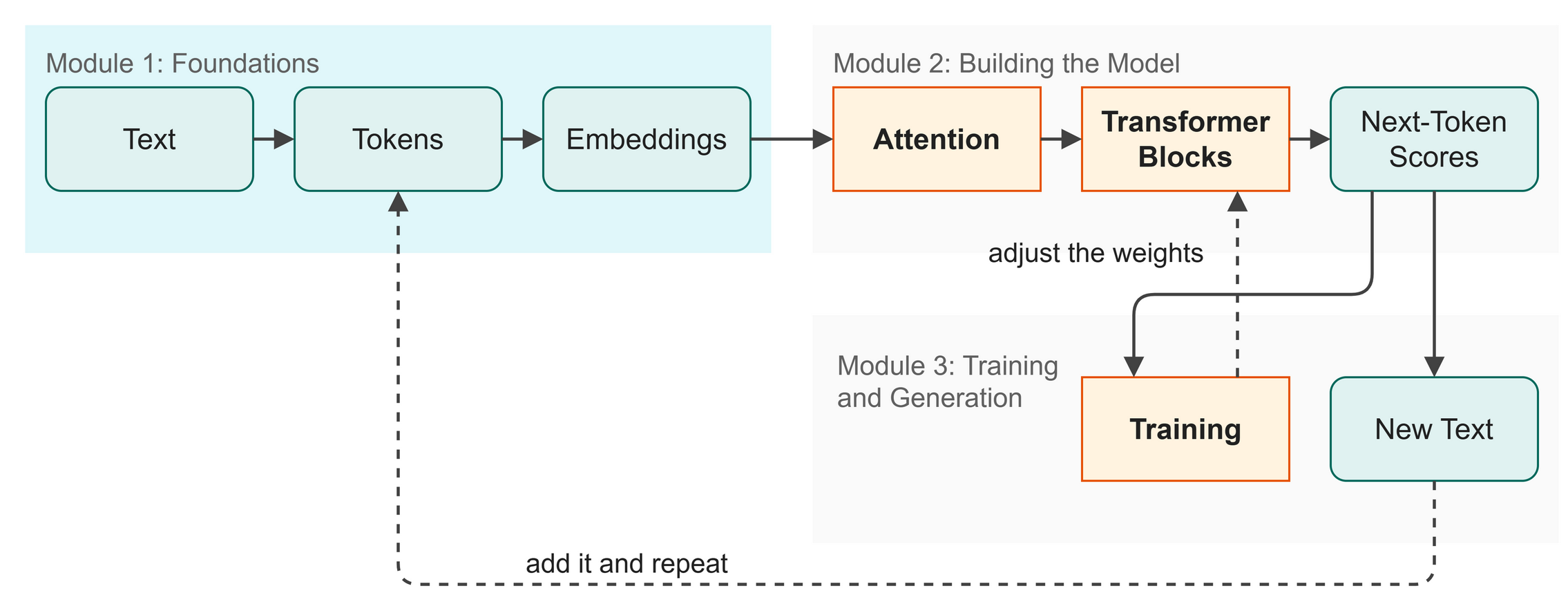 Figure 3.1: Tensors are the containers that carry data through every stage.
We understand the language model's goal from the previous chapter, so we can start building (Figure 3.1). Before we turn text into numbers, we need a way to store and manipulate those numbers efficiently. Tensors are the specialized containers that do this job, and PyTorch is the engine that processes them. The exact numbers you see may differ slightly on your computer or PyTorch version.
In this chapter you will:
- Learn what a tensor is and how it stores data.
- See how tensor shapes represent different dimensions.
- Understand how matrix multiplication transforms data.
- Turn raw scores into probabilities using Softmax.
Words to Know
- PyTorch: a Python library (ready-made code) that does math on large sets of numbers very quickly.
- Tensor: a container of numbers, arranged as a list, a table, or a stack of tables.
- Shape: how big a tensor is in each direction, such as how many rows and how many columns.
- Matrix Multiplication: a way of multiplying two tensors that turns data from one shape into another.
- Softmax: a function that turns any numbers into probabilities that sum to 1.
Theory: The Data Containers
PyTorch is a Python library for doing math on large arrays of numbers quickly. Without PyTorch, training would take weeks instead of minutes because pure Python is too slow for millions of calculations.
 Figure 3.2: Tensors can be 1D (a list), 2D (a table), or 3D (a stack of tables).
A tensor is a container of numbers: a list, a table, or a stack of tables (Figure 3.2). Programmers call it a multi-dimensional array. If you have ever used a spreadsheet, you already know 2D tensors, and a 3D tensor is a stack of spreadsheets.
In this book, we work mostly with 3D tensors. Their dimensions, or shape, represent:
- B = Batch size (how many sequences we process at once)
- T = Time (how many tokens in each sequence)
- C = Channel size (how many numbers we use to represent each token)
We write shapes like (B, T, C). For example, (32, 128, 128) means "32 sequences, each 128 tokens long, each token described by 128 numbers."
Matrix Multiplication as Data Transformation
 Figure 3.3: Matrix multiplication transforms data from one shape to another.
Matrix multiplication (written as @ in Python) is how neural networks transform data (Figure 3.3). The rule is that the inner dimensions must match, so a (3, 4) tensor can multiply a (4, 5) tensor, creating a new (3, 5) tensor.
Think of (3, 4) as "3 students each with 4 test scores" and (4, 5) as "4 test scores each mapped to 5 skill ratings". Multiplying them gives you "3 students each with 5 skill ratings".
Softmax: Turning Scores into Probabilities
Softmax is a mathematical function that takes any list of numbers (called logits) and turns them into probabilities (Figure 3.4). The probabilities are all positive and always sum to exactly 1.0. It does this using exponential functions, which grow very fast and so make the highest numbers stand out even more.
 Figure 3.4: Softmax forces numbers into a 0-to-1 range where they total exactly 1.0.
Code: Basic Operations
The code below shows the basic PyTorch operations we will use.
| src/ch02_tensors.py (excerpt) | |
|---|---|
Run the file to see how PyTorch handles these:
$ python src/ch02_tensors.py
--- 1. Creating tensors ---
1D tensor: tensor([1., 2., 3., 4.])
  shape: torch.Size([4])

2D tensor:
tensor([[1., 2., 3.],
        [4., 5., 6.]])
  shape: torch.Size([2, 3])
...
--- 2. Shapes and dimensions ---
x shape: torch.Size([2, 5, 8])  - (batch=2, time=5, channels=8)
...
3D matmul: torch.Size([2, 5, 8]) @ torch.Size([8, 4]) = torch.Size([2, 5, 4])
...
Softmax([1.0, 2.0, 3.0]) = [0.0900, 0.2447, 0.6652]
  Sum = 1.0000
What just happened:
- Lines 2 and 5 created 1D and 2D tensors, printing their shapes.
- Line 7 looked at a 3D tensor with a shape of
(2, 5, 8), representing(Batch, Time, Channels). - Line 9 multiplied a 3D tensor by a 2D matrix. PyTorch did the same multiplication for every sequence in the batch at once. This is called batched matrix multiplication, and it saves us from writing code that repeats the step one sequence at a time, which is slow in Python.
Shape Check
Table 3.1 shows the tensor shapes before and after matrix multiplication.
Table 3.1: Tensor shapes before and after matrix multiplication.
| Tensor | Shape | Meaning |
|---|---|---|
x |
(2, 5, 8) |
2 sequences, 5 tokens each, 8 numbers per token |
W |
(8, 4) |
Transformation weights: 8 inputs to 4 outputs |
y |
(2, 5, 4) |
2 sequences, 5 tokens each, now 4 numbers per token |
Try It
Open src/ch02_tensors.py, change logits = torch.tensor([1.0, 2.0, 3.0]) to [1.0, 2.0, 10.0], and run it. Notice how the highest number takes almost 100% of the probability after Softmax.
In Business
How data is represented matters. When we build our house-style email assistant, the text data is transformed into multi-dimensional tensors. The math operations we covered are how the assistant processes massive datasets to find hidden patterns in your company's writing voice.
Watch Out
A shape mismatch is the most common error in PyTorch. If you try to multiply (3, 4) and (5, 6), PyTorch will crash because the inner dimensions (4 and 5) do not match, so always check your shapes.
Key Takeaways
- A tensor is a container of numbers, which programmers call a multi-dimensional array.
- Shape
(B, T, C)= batch × time × channels, the standard convention in this book. @is matrix multiplication, and the inner dimensions must match.- Softmax turns any numbers into probabilities that sum to 1.
- PyTorch handles batches automatically using batched matrix multiplication, so we write no code that repeats the step for each sequence.
- Tensors are ready to hold our data, and the next stage in our map turns text into tokens.
Check Your Understanding
- What does the shape
(32, 128, 128)represent in our(B, T, C)format? - Why do the inner dimensions need to match in matrix multiplication?
- What is the difference between logits and probabilities?
Assignment
Assignment 3: One number, new shape
About 15 minutes. You change one number and write no new code. Work in this chapter's Colab notebook or on your own laptop.
- Run it. Run
src/ch02_tensors.pyas it is. Copy the line of output that starts with3D matmul:. - Change one number. Find the line
W = torch.randn(8, 4).Wholds the transformation weights. It takes in 8 numbers for each token and gives back 4. Change the4to6and run the script again. - Compare. Which numbers in the
3D matmul:line changed? Which stayed the same? How many numbers describe each token now? - Explain it. In two or three sentences a manager could follow, say what the multiplication changed about the data and what it left alone.
Hand in: both 3D matmul: lines, your answers to step 3, and your sentences.
Further Reading
The library you are typing into. The design argument behind the tool this book uses: write the model as ordinary Python that runs line by line, so you can print a tensor or stop in a debugger, and still get the speed of compiled code underneath. It is the reason the code in this book can be read top to bottom and still trains a real model.
Paszke, A., Gross, S., Massa, F., Lerer, A., Bradbury, J., Chanan, G., Killeen, T., Lin, Z., Gimelshein, N., Antiga, L., Desmaison, A., Köpf, A., Yang, E., DeVito, Z., Raison, M., Tejani, A., Chilamkurthy, S., Steiner, B., Fang, L., ... Chintala, S. (2019). PyTorch: An imperative style, high-performance deep learning library (arXiv:1912.01703). arXiv. https://doi.org/10.48550/arXiv.1912.01703
Next up: Chapter 4: Tokenization