Chapter 12: Dataset and DataLoader
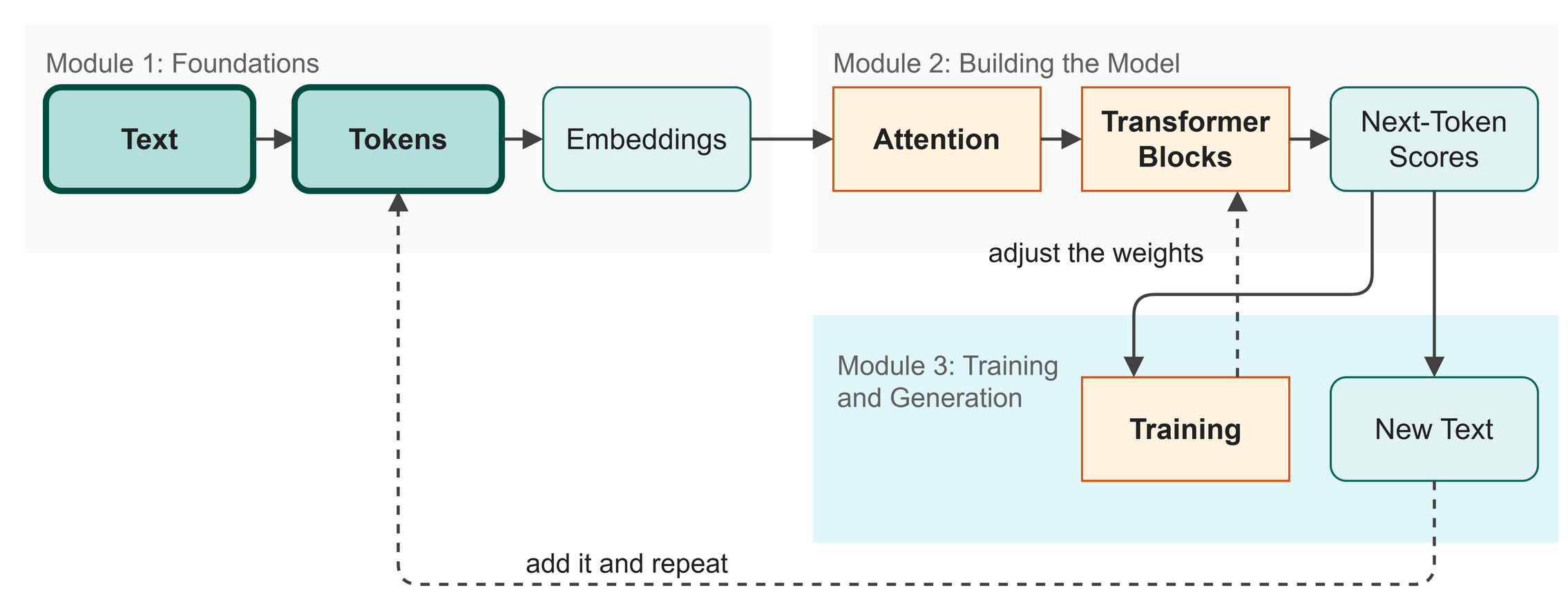 Figure 12.1: We begin the training module by preparing our data pipeline.
We have our model, and we know from Chapter 11 that our goal is to predict the next token. Now we need to feed data into the engine. Instead of pushing one character at a time, we will feed the model thousands of examples simultaneously. In this chapter, we build a pipeline to prepare and batch our Shakespeare dataset.
In this chapter you will:
- Use a sliding window to generate training examples.
- Understand how batches process multiple sequences in parallel.
- Build a PyTorch Dataset and DataLoader.
Words to Know
- Block Size: The maximum number of tokens the model can look at at one time (its context window).
- Batching: Grouping multiple training examples together and processing them at the same time.
- Dataset: A PyTorch tool that defines how to fetch one training example from the text.
- DataLoader: A PyTorch tool that automatically groups single examples into batches and shuffles them.
Theory
The Sliding Window
In the last chapter, we saw how a single sequence provides multiple training examples. But how do we extract these sequences from a massive text file like our selection of Shakespeare's plays?
We use a sliding window (Figure 12.2).
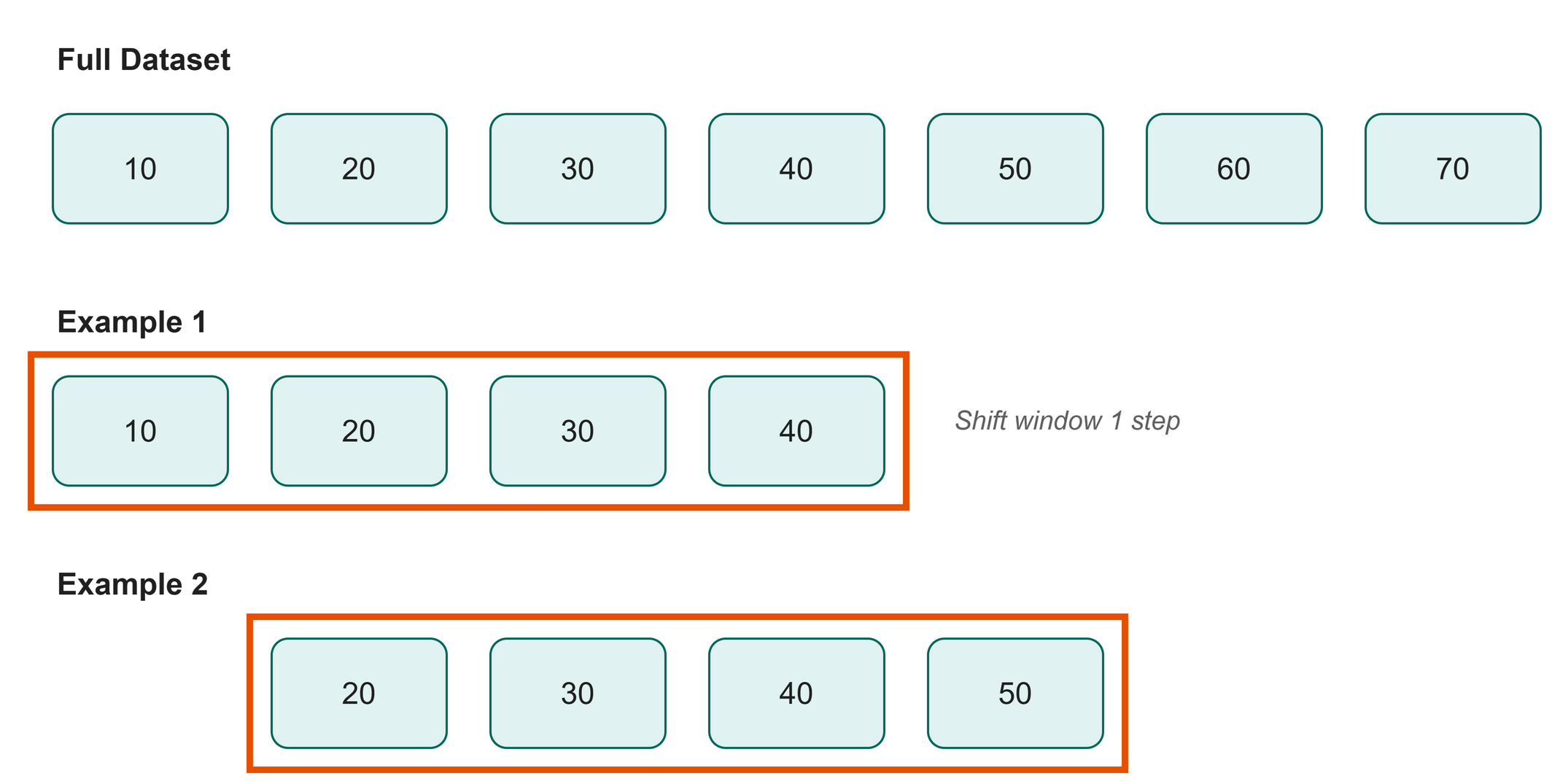 Figure 12.2: A sliding window creates multiple, overlapping examples from one long text.
Imagine a window that can only see a certain number of characters at a time. This is our block_size (the maximum context the model can handle). We place this window at the beginning of the text to grab our first sequence, and then slide it one character to the right to grab our second sequence. We repeat this until we reach the end of the text.
Processing in Parallel: Batches
If we fed each sequence to the model one by one, training would crawl. Modern computers, especially those with graphics chips (GPUs), are fantastic at doing the same math on many pieces of data at once, and they are wasted on one sequence at a time.
How much does it matter? Rather than guess, time it:
$ python src/examples/ch12_batch_speed.py
32 sequences, one at a time : 2.191 s
the same 32 as one batch    : 0.245 s
batching is 9.0x faster on this machine
Nine times faster, on an ordinary computer with no GPU. The training run in Chapter 13 took about eight minutes on the machine that produced its log. One sequence at a time, it would have run for over an hour. On a GPU, where thousands of arithmetic units sit idle waiting for work, the gap is wider still.
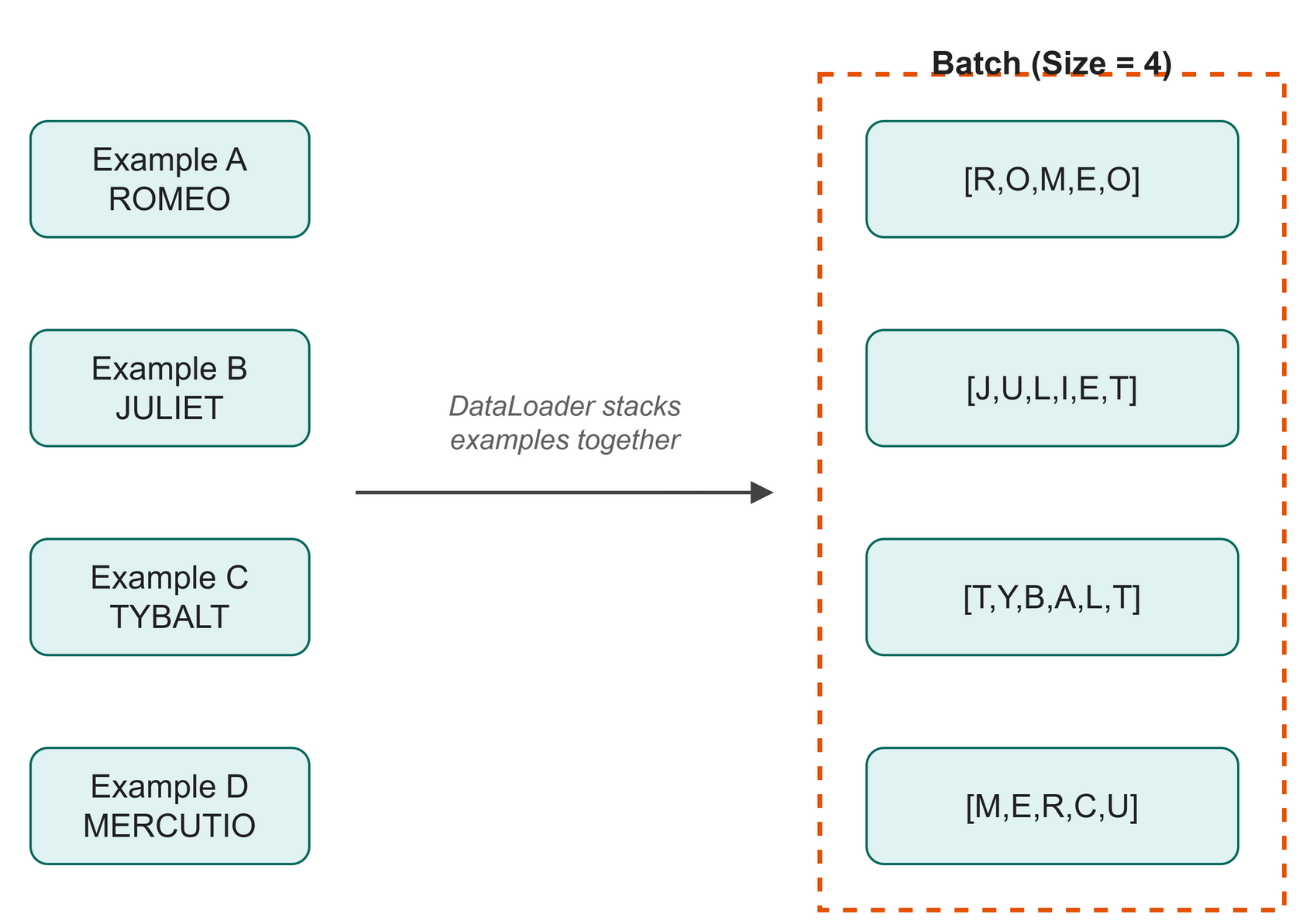 Figure 12.3: A batch stacks multiple independent examples into a single block.
We group multiple sequences together into a batch (Figure 12.3). If our batch size is 32, we pass 32 independent sequences through the model in one go. The model processes them in parallel, calculates the loss for all 32, and averages it out.
Why 32 and Not 1, or 1,000
Speed is only half the reason to batch. The other half is the quality of the step the model takes.
Remember what the loss is for: it produces a direction to nudge the weights. With a batch of 1, that direction comes from a single stretch of Shakespeare, which might happen to be a stage direction, a run of dialogue, or a line of mostly spaces. The model would lurch after each one, correcting hard for whatever it just saw. Averaging the loss over 32 independent sequences cancels most of that noise out, so each step points somewhere closer to the truth for the text as a whole.
Why not 1,000, then? Two reasons. The whole batch has to fit in memory at once, and memory is the limit you hit first on a laptop. Beyond that, the returns fade: averaging 1,000 sequences gives a direction only slightly truer than averaging 32, while each step costs thirty times as much. The number 32 is not sacred, and you will see other books use 16 or 64. It is a size that is large enough to steady the direction and small enough to fit.
We are now at the start of the "Training" stage on our map. With our data batched and ready, we can finally feed it into the model and start the training loop.
Code
To handle this efficiently, we use two built-in PyTorch tools: Dataset and DataLoader (Figure 12.4).
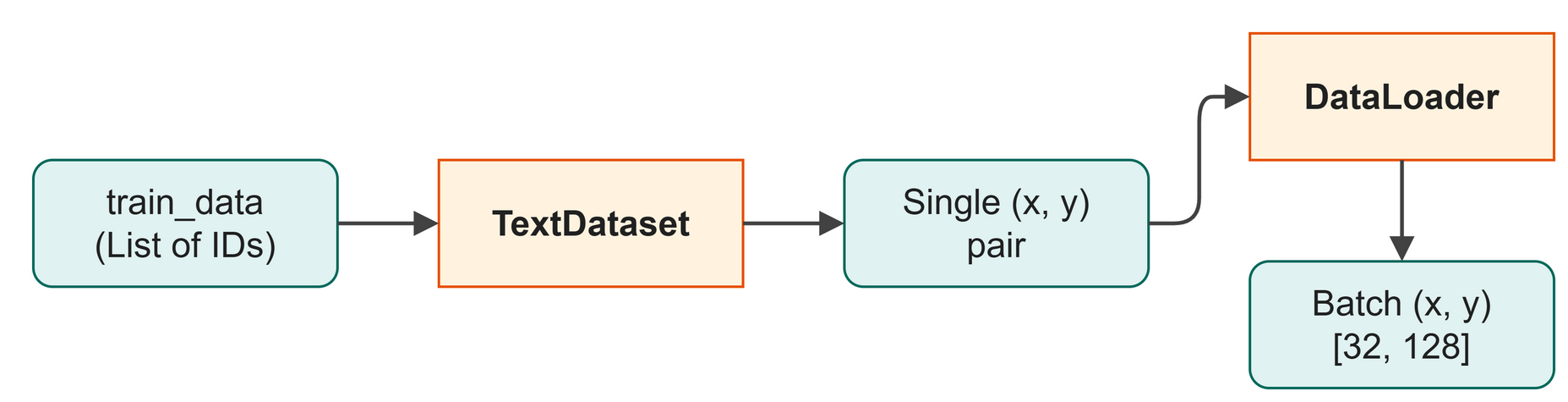 Figure 12.4: The Dataset handles the sliding window, and the DataLoader stacks the examples into a batch.
Run the full script to see the pipeline produce one batch:
$ python src/ch11_dataloader.py
Data loaded: 1,115,394 total tokens
  Train : 1,003,854 tokens
  Val   : 111,540 tokens

Dataset sizes:
  Train examples: 1,003,726
  Val   examples: 111,412

DataLoader config:
  Batch size  : 32
  Train batches per epoch: 31,367

--- Inspecting one batch ---
x_batch shape: torch.Size([32, 128])  (batch_size, block_size)
y_batch shape: torch.Size([32, 128])  (batch_size, block_size)

First example in batch:
  x (input)  : 'ness! serious vanity!\nMis-shapen chaos of well-seeming for...
  y (target) : 'ess! serious vanity!\nMis-shapen chaos of well-seeming form...
  (y is x shifted by 1 character)

DataLoader ready! Ready for Chapter 13.
What just happened:
- We loaded our text file and converted it to token IDs.
- Lines 12 and 14 are the sliding window in
TextDataset. Line 12 cuts out the stretch of text that starts at positionidx. Line 14 cuts out the same stretch moved one character to the right, which is its target. - Lines 21 to 23 create a
DataLoaderthat automatically batches and shuffles the training data. One full pass over all the batches is called an epoch, the word in the output above. - We grabbed one batch and inspected it to confirm the target
yis the inputxshifted by one character.
Shape Check:
Table 12.1 lists the shapes of the batched input and target.
Table 12.1: Tensor shapes for the batched input and target sequences.
| Variable | Shape | Meaning |
|---|---|---|
x_batch |
[32, 128] |
32 sequences, each containing 128 input characters. |
y_batch |
[32, 128] |
32 sequences, each containing 128 target characters. |
Try It
We can see the sliding window in action with a tiny dataset.
Lines 12 and 13 slice the array to create overlapping sequences for the input and target.
$ python src/examples/ch12_batching_demo.py
Data: [10, 20, 30, 40, 50, 60, 70]
Block size: 3

Example 1:
  Input  : [10, 20, 30]
  Target : [20, 30, 40]
Example 2:
  Input  : [20, 30, 40]
  Target : [30, 40, 50]
Example 3:
  Input  : [30, 40, 50]
  Target : [40, 50, 60]
Example 4:
  Input  : [40, 50, 60]
  Target : [50, 60, 70]
Try It
Open src/examples/ch12_batching_demo.py. Change block_size to 4, run it again, and notice how the number of available examples decreases.
In Business
Imagine your house-style assistant needs to learn from a massive archive of 100,000 corporate documents. You wouldn't train it by showing it one word at a time. Processing data in parallel batches is like having the assistant review 32 different emails simultaneously and learn from all of them, which is the key to training efficiently at scale.
Watch Out
Be careful with the __len__ of your dataset. If you have 100 characters and a block_size of 10, you can only create 90 starting positions because you need 11 characters (10 for input, 1 extra for the target) for a valid example. That is why the code uses len(self.data) - self.block_size.
Key Takeaways
- A sliding window extracts overlapping sequences from a continuous block of text.
- Batching processes multiple independent sequences in parallel, which speeds up training.
- PyTorch's
Datasetdefines how to grab a single example. - PyTorch's
DataLoaderhandles the tedious work of grouping examples into batches and shuffling them.
Check Your Understanding
- If you have a sequence of 1000 tokens and a block size of 100, how many examples can a sliding window extract?
- Why is batching important for training speed?
- Why do we shuffle the training data?
Assignment
Assignment 12: Follow one number
About 15 minutes. You change one number and write no new code. Work in this chapter's Colab notebook or on your own laptop.
- Run it. Run
src/examples/ch12_batching_demo.pyas it is. Copy the four examples it prints, each with its Input and its Target. - Change one number. Find the line
data = torch.tensor([10, 20, 30, 40, 50, 60, 70]). These seven numbers stand in for a text of seven characters. Change the40in the middle to any whole number that is not already in the list, and run the script again. - Compare. In how many examples is your number part of the Input? In how many is it part of the Target? How many examples does the script print now, and did that count change?
- Explain it. In two or three sentences a manager could follow, say how a sliding window turns one text into many training examples, and why one character can appear in several of them.
Hand in: both sets of four examples, your answers to step 3, and your sentences.
Further Reading
Why the field started building bigger. Before this, deciding how large to make a model, how much text to train it on, and how much compute to spend was guesswork. The paper measured all three and found the error falls along smooth, predictable curves across a very wide range of sizes. That turned model building into a budgeting exercise, and it is the reason the industry spent the following years scaling up. It also explains the ceiling on the model you train here: a few hundred thousand parameters and a few hundred thousand characters of Shakespeare buy a certain quality of text, and no more.
Kaplan, J., McCandlish, S., Henighan, T., Brown, T. B., Chess, B., Child, R., Gray, S., Radford, A., Wu, J., & Amodei, D. (2020). Scaling laws for neural language models (arXiv:2001.08361). arXiv. https://doi.org/10.48550/arXiv.2001.08361
Next up: Chapter 13: The Training Loop